
DOCUMENTATION
Themes, languages & preferences
Fourteen built-in themes, extensible custom themes, seven interface languages, and an in-app Preferences panel for the everyday switches. Everything persists in config.toml .
Built-in themes
Markion ships fourteen built-in themes, each carefully tuned:
Pick one by swatch in the Preferences panel (Ctrl+,).
Custom themes
Custom themes are .toml files in Markion's local themes directory. Each file needs a name, is_dark flag, and a [colors] sub-table with eight color keys:
name = "Midnight"
is_dark = true

[colors]
app_bg      = "#10131a"
panel_bg    = "#171b24"
surface_bg  = "#0f1720"
text        = "#e5edf5"
muted       = "#91a4b7"
border      = "#2b3544"
active_bg   = "#23304a"
active_text = "#9ec5ff"- Color values accept either
"#rrggbb"or bare"rrggbb"; any color you omit falls back to the default palette, so a partial file still loads. - Activate a custom theme by setting
theme = "Midnight"inconfig.toml(using the theme'sname, not the file stem). - On first use a
typewriter.tomlsample is installed as a starting point—including the optional[fonts]table (editor,rendered,code) that supplies font families for the Markdown source editor, rendered body text, and code surfaces whenever you have no explicit preference. - Legacy
.themefiles migrate automatically when first loaded: Markion parses the file once, writes the equivalent.tomlnext to it, and leaves the original.themein place (ignored thereafter).
Interface languages
Seven interface languages: English, Simplified Chinese, Traditional Chinese, Japanese, French, German, and Spanish.
Preferences panel
The panel has four tabs:General, Appearance, Shortcuts, and Export. Appearance groups themes, source / reading / code fonts, source and reading sizes, and paragraph spacing. Export controls the default backend and PDF / DOCX options.
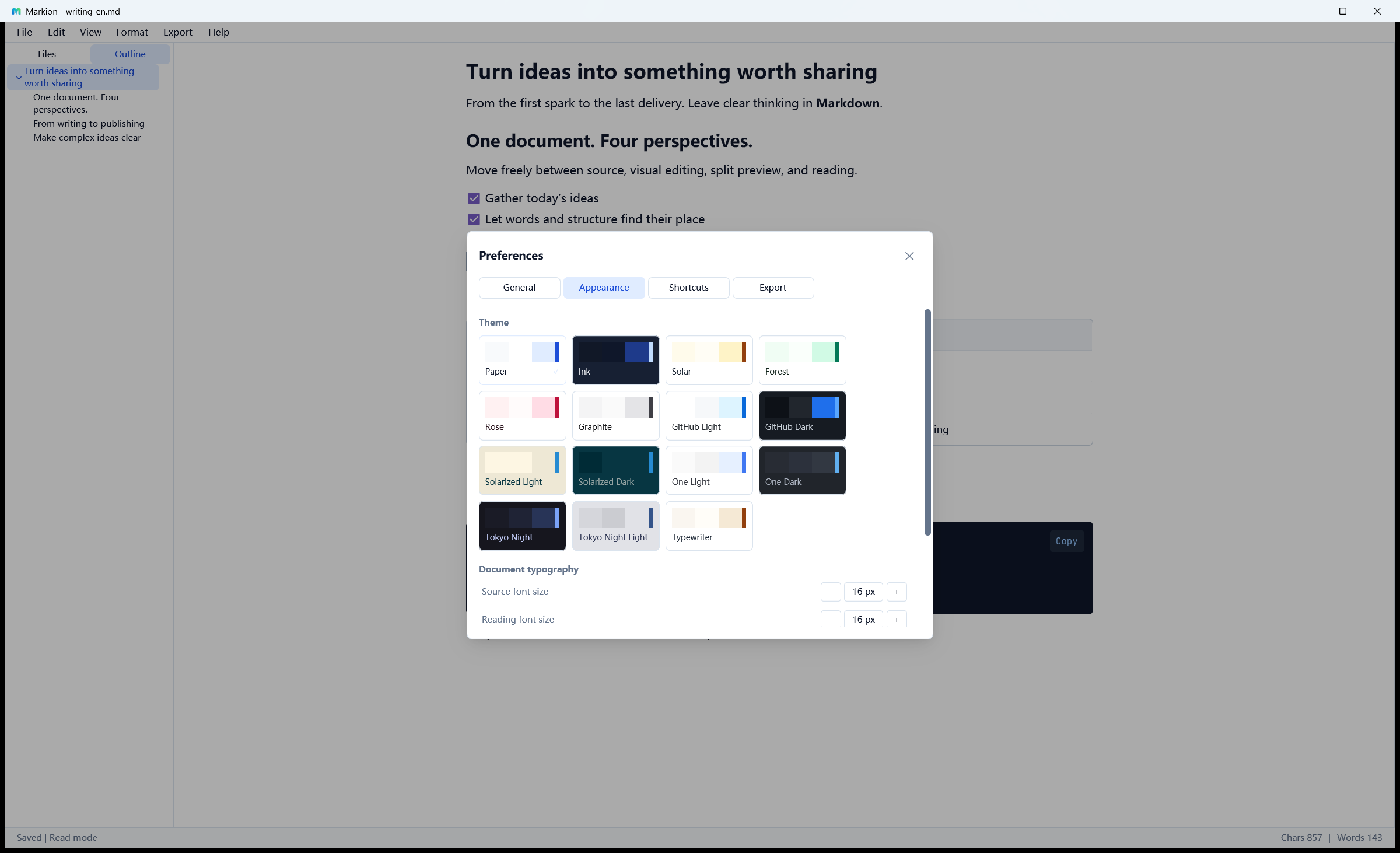
Common settings include:
- Theme and interface language
- Open documents in the current tab, with unsaved drafts protected
- Silent Save and a 1–300 second idle delay; disabling Silent Save keeps recovery active
- Source / reading size from 10–32 px; paragraph spacing from 0–32 px
- Sidebar visibility
- Preview adaptive width
- Focus mode (dims paragraphs outside the current one) and typewriter mode (keeps the cursor line vertically centered)
- Code line numbers
- Sync scroll
- Show hidden files
- Heading-menu depth (H1–H5 or H1–H6)
- Per-plane font families (source, reading, code) with a follow-theme default
Preferences persist in config.toml; a legacy preferences.conf from a pre-TOML build is migrated on first launch and left in place.
config.toml reference
All configuration fields are optional. The main defaults and file-only settings are:
theme = "Paper"
language = "en"
focus_mode = false
typewriter_mode = false
code_line_numbers = true
preview_adaptive_width = false
heading_menu_max_level = 5        # 5 or 6
sync_scroll = false
sidebar_visible = true
sidebar_tab = "files"             # "files" or "outline"
show_hidden_files = false
open_in_current_tab = true
editor_font_size = 14
rendered_font_size = 14
paragraph_spacing = 12

# Optional font families per plane; absent = follow the theme, then the
# built-in default (system UI font for source/reading, JetBrains Mono for code).
# editor_font_family = "Cascadia Code"
# rendered_font_family = "Georgia"
# code_font_family = "JetBrains Mono"

[auto_save]
enabled = true
silent_save = true
delay_secs = 5

[export]
backend = "builtin"
pdf_engine = "xelatex"
Menu-action shortcut overrides live in the [shortcuts] table (action id → GPUI keystroke string) and can also be edited from the Preferences panel; see Keyboard shortcuts.
Data directories & logs
Configuration, recovery files, themes, and rotating diagnostic logs use platform-appropriate Markion data directories:
| Platform | Config dir (config.toml, themes/) | Recovery dir | Logs dir |
|---|---|---|---|
| Windows | %APPDATA%\Markion\ | %LOCALAPPDATA%\Markion\Recovery\ | %LOCALAPPDATA%\Markion\Logs\ |
| macOS | ~/.config/markion/ (XDG) | ~/.cache/markion/recovery/ | ~/Library/Logs/Markion/ |
| Linux | ~/.config/markion/ (XDG) | ~/.cache/markion/recovery/ | ~/.cache/markion/logs/ |
RUST_LOG=debug before launching for more detailed logs.